

Guidance for Building a GitHub Portfolio
A practical guide for cybersecurity and IT students.
You've heard of GitHub. You know you're supposed to be using it. But what exactly is it — and how do you get started? With advice from a Bellevue College instructor, we assembled this beginner's guide just for you.
15-minute read.
What GitHub is and Why You Need a Portfolio
GitHub is a platform where developers and security professionals store, share, and collaborate on work. Think of it as a combination of a portfolio website, a version history of things you've built, and a professional networking tool — all in one place. But you don't have to be a programmer to use it well.
A diploma alone rarely gets you hired in today's market. Hiring managers are flooded with résumés from people with the same degrees, certifications, and bullet points. What cuts through is evidence — something they can click on, scroll through, and evaluate for themselves. That's what a GitHub portfolio gives you. Building one is far more approachable than it sounds. You just need to start.
Why Building a Portfolio Actually Matters
Let's be honest, the job market is tough. People are using AI-powered tools to mass apply, so hiring managers are flooded with résumés. Your GitHub portfolio supplements the résumé and sets you apart.
Benefits:
- It proves your skills - A step beyond “claiming” you have skills
- It builds over time - Every new project makes the portfolio stronger, so start soon!
- It deepens your understanding - Writing clear README files forces you to articulate what you did and why. Thus learning solidifies.
- It's on an industry standard - Being fluent on GitHub is an expected norm in the cyber and IT industry.
- Gives you something to talk about - At networking events and interviews, a portfolio is worth more than a sales pitch.
- It works for multiple tracks - Not just for developers, GitHub is useful for the SOC Analyst, GRC, DevSecOps, or cloud security.
How to Start (Even if You Have Nothing to Share Yet)
The biggest obstacle most students face is the blank repository. Here's a structured path from zero to a portfolio that's worth showing.
But first, understand these basics:
- Git = version control software that tracks changes in your code
- GitHub = a website that hosts your Git repositories online
- Repository (repo) = a project folder that Git tracks
01 Create Your Account and Set Up Your Environment
- Create a free account at github.com
- Use a professional username and write a short bio. First impressions matter. Keep it professional.
- Install Git on your computer from git-scm.com
- Configure Git with your identity as follows:
git config --global user.name "Your Name"
git config --global user.email "you@example.com"
02 Learn the Core Git Commands
After you get everything set up, plan to get very comfortable with these basic commands: git init, git add, git commit, and git push. Bellevue College instructors now require students to create and submit files using Git commands directly — it builds muscle memory.
| Step | Command | What it does |
| Clone a repo | git clone | Download a repo to your computer |
| Check status | git status | See what files changed |
| Stage changes | git add | Prepare files to save |
| Commit | git commit -m "message" | Save a snapshot of your changes |
| Push | git push | Upload changes to GitHub |
| Pull | git pull | Download latest changes |
03 Create Your First Repository
- On GitHub, click "New" → name your repo → click "Create repository"
- Clone it locally: git clone https://github.com/yourname/yourrepo.git
- Add a file, then run: git add .git commit -m "My first commit" git push
04 Key Concepts to Learn Next
- Branches — work on features without affecting the main code (git checkout -b new-feature)
- Pull Requests (PRs) — propose changes and get them reviewed before merging
- Forking — copy someone else's repo to your account to experiment
- README.md — a markdown file that describes your project (very important!)
- .gitignore — tells Git which files to ignore (e.g., passwords, build files)
05 Best Practices and Beginner Tips
A README is your project's cover letter. For security projects, include: the scenario or problem you were solving, your assumptions, the tools you used, your findings, and a "Lessons Learned" section. Screenshots of key output are a plus.
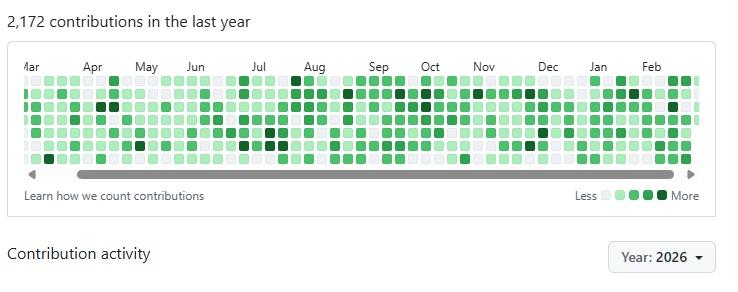
- Commit often - Regularly pushing changes keeps your remote repository updated AND lights up your contributions graph.
- Clearly explain your commits (e.g., "Add login button" not "stuff".)
- Don't panic if you make mistakes — Git lets you undo almost anything
- Start with GitHub Desktop if you prefer a visual interface over the command line
- Explore other repos on GitHub to learn how real projects are structured
Even on personal projects, practice creating branches for features or experiments, then merging via pull requests. This is how professional teams work, and interviewers notice when you understand it.
06 Post Your First Project and Stay Active
Don't wait until it's perfect. A log analysis exercise from class, a completed CTF writeup, or a home lab configuration is enough to start. The act of publishing builds the habit.
Your GitHub contribution graph is a visual résumé. Regular commits — even small ones — signal to employers that you're engaged and constantly learning. Aim for consistency over bursts.
07 Additional Resources
- 🎓 GitHub Skills — interactive courses by GitHub
- 📖 A beginner's handbook, by Sumit Saha on freecodecamp.org
- 📖 Pro Git Book — free, comprehensive guide
- 🎮 Learn Git Branching — visual, interactive game
- 📺 YouTube — search "GitHub for beginners"
- Try this LinkedIn Learning course, which includes a certificate of completion. Remember that LinkedIn Learning courses are FREE with your Washington city or county library account.
GitHub Is More Than Version Control
Most students encounter GitHub as a place to submit code or back up projects. That's just the surface. Professionals use it as an operational hub across nearly every discipline in tech — and increasingly, hiring managers look at it the way they look at a LinkedIn profile.
- Store investigation artifacts - PCAPs, logs, and IOC lists from security exercises and labs
- Track detection logic - Sigma rules, Surcata/Nort rules, and SIEM queries
- Write security docs - Runbooks, threat reports, IR playbooks, and compliance frameworks
- Reproduce vulnerabilities - Lab environments and configs that demonstrate your methodology
- Collaboration and review - Issues, pull requests, and code reviews mirror real team workflows
- Demonstrate auditability - Clear commit history shows your thinking process over time. Don't forget those README files!
The key insight from Bellevue College instructors: a hiring manager reviewing your GitHub isn't just looking at what you built. They're looking at how you think, how you communicate, and whether you stick with things. Commit history and README quality say a lot.
What Projects to Include
Your portfolio should reflect both your technical range and what genuinely interests you. A project you care about will be better documented, more fully developed, and far easier to talk about in an interview. The medium matters less than the act of creating, refining, and sharing it.
Blue Team Incident Response
- Log Analysis - Walk through a set of logs, identify suspicious activity, document your methodology, and describe remediation steps. Include screenshots or redacted samples.
- IR Timeline - Simulate a ransomware or phishing incident and build an incident response timeline with attacker behavior mapping. Shows you can think like a defender.
- PCAP Analysis - Capture and analyze network traffic from a lab environment. Document what you found and how you found it.
GRC and Documentation Tracks
GitHub portfolios aren't just for coders. If you're heading toward Governance, Risk, and Compliance, use GitHub to version-control your documentation. Post policy drafts, audit frameworks, compliance checklists, and security runbooks. A well-maintained repository of security documentation demonstrates technical writing and organizational skills just as powerfully as a script does.
Machine Learning & Automation Projects
Instructors at Bellevue College specifically recommend exploring machine learning applications in security contexts — anomaly detection, malware classification, and log parsing. Projects like the Malcolm Stack (a network traffic analysis framework) represent the kind of technical depth that stands out. Even a simplified implementation with a solid README demonstrates you're thinking ahead.
Projects that Combine Multiple Skills
Some of the most impressive portfolio pieces may not fit neatly into a single category. Consider building a personal website with a CI/CD pipeline that tests and deploys your code on every push. Projects like these demonstrate automation, systems thinking, and the ability to ship something end-to-end — all in one repo.
Understanding CI/CD
Continuous Integration and Continuous Delivery (CI/CD) is one of the most in-demand skill sets in DevSecOps — the integration of security into software delivery pipelines.
Basic CI/CD Pipeline Flow:
Code Push → Automated Tests → Security Scan → Build → Deploy to Live
At Bellevue College's SEC460 course, students push application code to Google Cloud via GitHub triggers — experiencing exactly this flow. The result is a meaningful portfolio artifact and a real-world skill baked in.
Starting small is fine. Set up a GitHub Actions workflow that runs a linter or a simple test on every commit to your personal site. Once it's working, add a step that deploys to a server or cloud host. You now have a CI/CD pipeline — and something concrete to walk an interviewer through.
Avoid this mistake: Building a project for class, then archiving it and moving on. Rather, treat every repository as an ongoing artifact. A project that shows iterative improvement over months signals maturity that a one-time assignment never can. It also shows your commitment to your projects and a drive for continuous improvement.
Force Multipliers
Hackathons and Home Labs
Hackathons help you build something real under pressure, often with a teammate — and the project you produce is an immediate portfolio artifact. A home lab using refurbished hardware and free hypervisors like Proxmox is also a low-cost way to run experiments and generate projects worth documenting.
Professional Networking
A significant portion of hiring in tech still happens through professional connections. Remember that a portfolio doesn't replace the need for those relationships. Rather, it supplements them by giving you a tangible answer to the question, “What have you been working on?” The portfolio is the foundation; the conversation is the catalyst.
College cyber programs that invite guest speakers, run hackathons, and facilitate introductions to alumni are giving students a leg up. Take those opportunities seriously. Show up, ask good questions, and follow up. The combination of a visible portfolio and an in-person impression is extraordinarily hard to compete with.
Actionable advice: Attend at least one local tech meetup, hackathon, or industry event per semester. Bring a clear, one-sentence description of your most interesting GitHub project. Practice saying it out loud before you go.
Start Now
Every senior professional in cybersecurity was once exactly where you are now - at the beginning. For now, be willing to start with something, even if you know it could be better - because it will get better. Week by week, you'll add more, make improvements, and grow that contribution graph into something to impress a hiring manager.
By Nichole Schmmitt
Special thanks to:
Anand Injeti, Bellevue College instructor in the Information Technology Program
Daniel Brandao, Bellevue College graduate and T-Mobile Software Engineer